
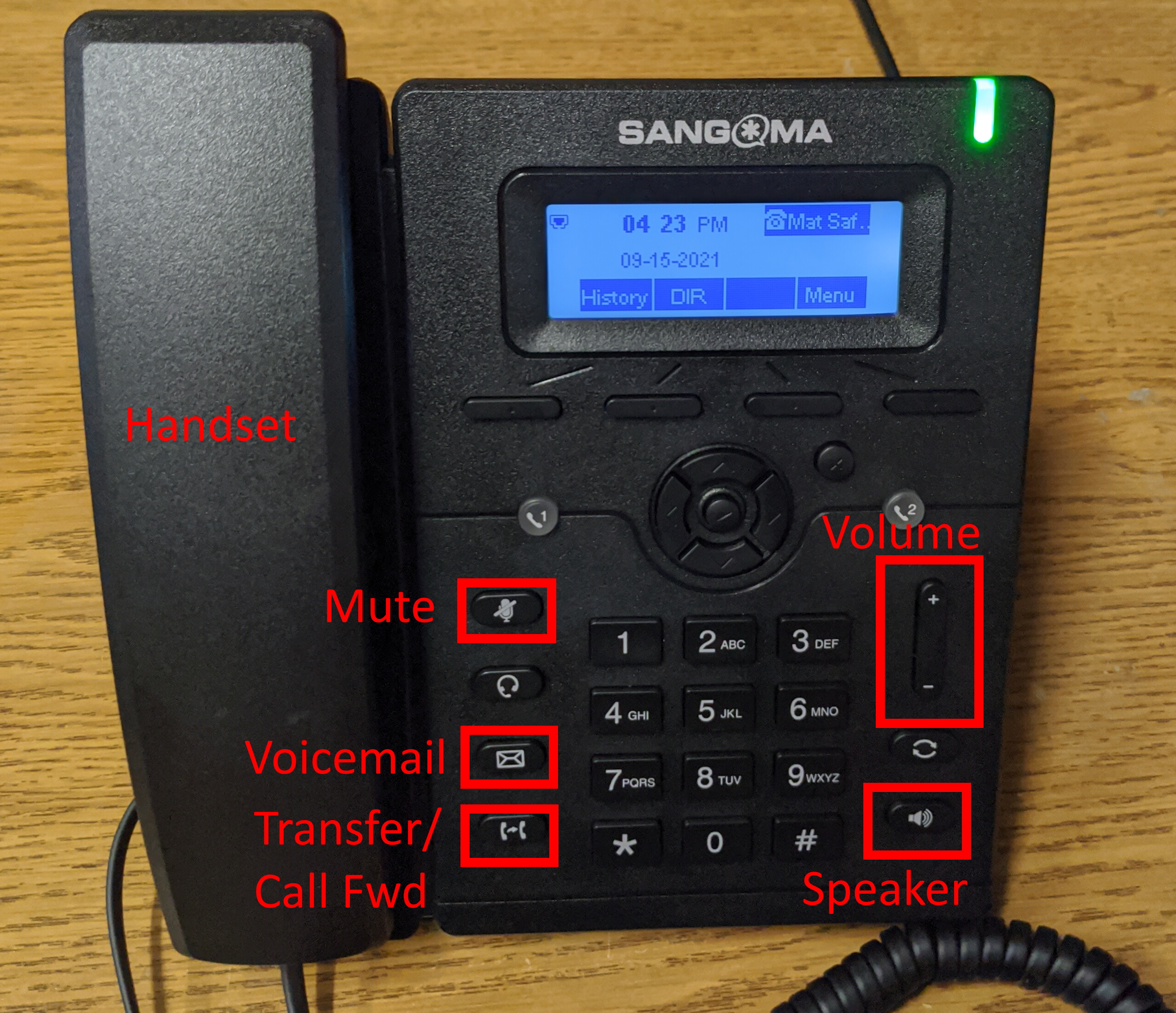
To answer an incoming call: Pick up the handset OR press the speaker button to answer call on speaker.
To dial an internal extension: Pick up the handset OR press the speaker button THEN dial the extension.
To place a local 831 call: Pick up the handset OR press the speaker button THEN dial the 7-digit number
To place a long distance (non-831 call): Pick up the handset OR press the speaker button THEN dial 10-digit number
To transfer a call: press the transfer button (bottom left) then dial the extension number
To transfer directly into voicemail: press the transfer button (bottom left) then dial * and the extension number
To dial voicemail: press the Voicemail icon then type your voicemail password when prompted
To set greetings: In voicemail press 0 for mailbox options THEN press 1 to record unavailable message OR 2 to record busy message OR 3 to record name OR 4 to record temporary greeting (when on leave/vacation) OR 5 to change the password.
To set call forwarding: While not on a call press the Transfer/Call Fwd button. Select option 2 to set a forward number.
-For an 831 number enter the 7-digit phone number THEN select SAVE.
-For a non-831 number enter the 10-digit phone number THEN select SAVE.
Once the call forward number is set to toggle call forwarding on and off just press the call forward button (while not on a call).