
There are two options for transferring a phone call to another extension:
Extension Transfer (warm-handoff) is used when you want to stay on the line to let the person you are transferring the call to know who the original caller is. When using this method the person you are transferring the call to will see your extension listed on their caller-id.
Blind Transfer (cold-handoff) is used when you do not wish to stay on the line until the person you are transferring the call to picks up. When using this method the person you transfer the call to will see the original callers phone number on their caller-id.
Extension Transfer
- While on the line with the caller you wish to transfer, locate the option "xfer" near the bottom right corner of your phones display, then press the button directly underneath.
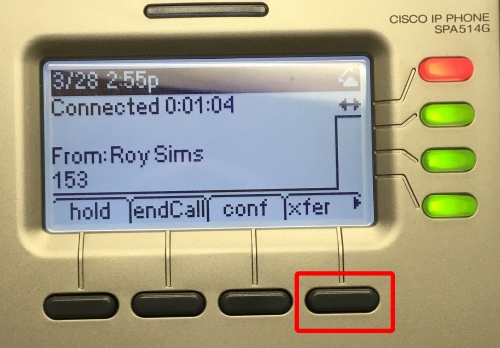
- When prompted to "Enter Number:" dial the 3 digit extension of the person you wish to transfer the call to.
- Remain on the line until the person you are transferring to picks up the call.
- When ready to complete the transfer hang up the phone. The person you transferred the call to should now be connected to the original caller.
Blind Extension Transfer
While on the line with the caller you wish to transfer, first press the right arrow key (a) located on the directional pad beneath the phone's display. Near the bottom left corner of your phone's display you should now see the option "bxfer", press the button directly underneath (b).
(a)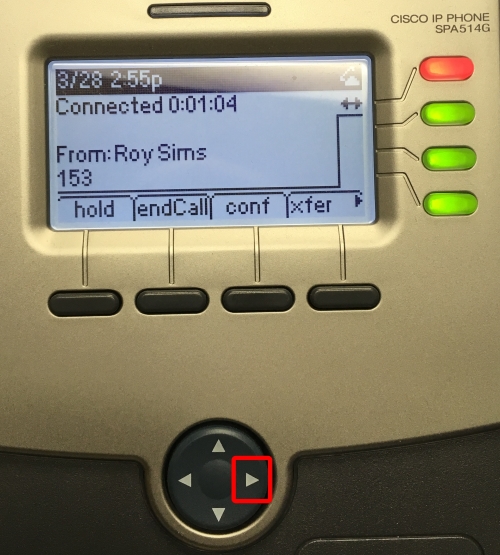 (b)
(b)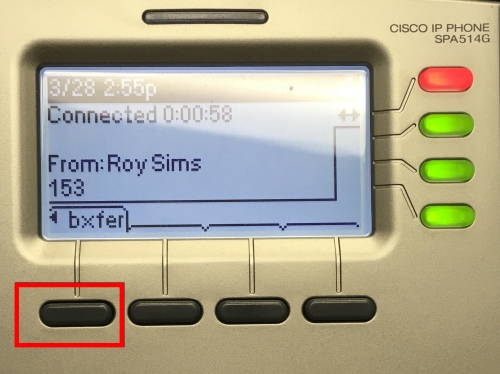
- When prompted for the "Blind Transfer Target:" enter the 3 digit extension of the person you wish to transfer the call to.
- When you hear the call hang up the transfer has gone through. The transfer is complete and you may now hang up the phone.